
Download Wraith Docs – AI Writing Assistant for Google Docs
Overview
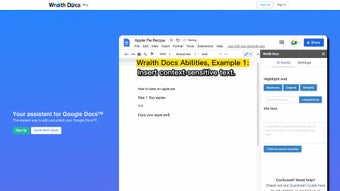
Wraith Docs is a next‑generation AI writing assistant that lives inside Google Docs, turning the familiar cloud‑based editor into a powerhouse of intelligent text manipulation. Built for students, marketers, freelancers, and anyone who spends time drafting documents, Wraith Docs brings a suite of AI‑driven tools directly to the Google workspace. The moment you launch the add‑on, you gain access to real‑time paraphrasing, sentence expansion, readability simplification, and SEO‑focused keyword integration—all without leaving the document you’re already working on.
By analyzing the surrounding context, the assistant can suggest relevant additions, rewrite awkward phrasing, or tighten overly wordy sections, making the editing cycle faster and less frustrating. Because it runs as a native Google Docs extension, there’s no need to copy‑paste content into a separate web portal; everything stays secure within Google’s ecosystem, and changes are saved automatically to your Drive. Whether you’re polishing a research paper, drafting a sales proposal, or optimizing a blog post for search engines, Wraith Docs promises to reduce the time spent on manual revisions and elevate the overall quality of your writing.
Its emphasis on contextual awareness, coupled with a lightweight interface, means you can focus on ideas while the AI handles the grunt work of phrasing, structure, and SEO compliance.
Features & Benefits
- Context‑Aware Paraphrasing: Instantly rewrite sentences while preserving original meaning, ideal for avoiding plagiarism or refreshing stale copy.
- Text Expansion & Elaboration: Generate detailed paragraphs from short prompts, perfect for fleshing out outlines or adding depth to bullet points.
- Readability Simplifier: Transform complex jargon into clear, concise language, boosting comprehension for diverse audiences.
- SEO Keyword Integration: Suggest and embed relevant keywords naturally, helping your document rank higher in search engine results.
- Custom Writing Prompts: Save personalized prompts for recurring tasks such as email drafts, product descriptions, or academic abstracts.
- One‑Click Formatting: Apply consistent heading styles, bullet formats, and citation structures with a single click.
- Secure Cloud Sync: All edits are stored within Google Drive, ensuring data privacy and version control.
- Real‑Time Collaboration: Team members see AI suggestions instantly, making group editing smoother and more coordinated.
Pros
- Seamless integration with Google Docs eliminates the need for separate applications.
- AI models are trained on a broad corpus, delivering accurate paraphrasing and expansion.
- Built‑in SEO tools save time for marketers and content creators.
- Lightweight interface keeps the Google Docs UI uncluttered.
- Free tier available with essential features; premium plan adds advanced customization.
Cons
- Relies on internet connectivity; offline usage is limited.
- Advanced features (e.g., bulk document processing) require a paid subscription.
- AI suggestions may occasionally need human review for nuanced topics.
- Only works within the Google ecosystem; not available for Microsoft Word or desktop editors.
- Performance can vary slightly on older browsers.
Installation & Compatibility
Getting started with Wraith Docs is straightforward and takes just a few minutes. First, open Google Docs in your preferred web browser (Chrome, Firefox, Edge, or Safari) and navigate to the Google Workspace Marketplace. Search for “Wraith Docs” and click Install.
You’ll be prompted to grant the add‑on permission to read and edit documents in your Drive—this is necessary for the AI to insert suggestions directly into your files. Once installed, a new “Wraith Docs” menu appears on the Google Docs toolbar. Clicking it opens a side panel where you can type prompts, select text for paraphrasing, or enable the SEO optimizer.
Because Wraith Docs runs entirely in the browser, it is compatible with any operating system that supports Google Docs, including Windows 10/11, macOS Monterey and later, Chrome OS, as well as Linux distributions. Mobile users on Android or iOS can also access the add‑on, though the full feature set is best experienced on a desktop or laptop where the side panel offers more screen real estate. The extension follows Google’s security standards, ensuring that data never leaves your Drive without encryption. Updates are delivered automatically through the Marketplace, so you always have the latest AI models and bug fixes without manual intervention.
For teams, an admin can deploy Wraith Docs across an organization via the Google Admin console, allowing centralized management of licenses and permissions. After installation, a quick walkthrough tutorial guides new users through core functions—paraphrase, expand, simplify, and SEO optimize—so you can start improving documents right away.
Conclusion & Frequently Asked Questions
Wraith Docs bridges the gap between powerful AI writing assistance and the collaborative convenience of Google Docs. By embedding paraphrasing, expansion, readability, and SEO tools directly into the document editor, it removes the friction of switching between apps and accelerates the entire drafting process. Whether you’re a content marketer looking to boost organic traffic, a student polishing an essay, or a professional drafting client proposals, Wraith Docs offers a secure, cloud‑based solution that respects your workflow and data privacy.
The free tier is generous enough for occasional users, while the premium plan unlocks deeper customization and higher usage limits for power users. Ready to transform the way you write? Download Wraith Docs today and experience AI‑driven editing without leaving Google Docs.
Is Wraith Docs free to use?
Wraith Docs offers a free tier that includes core features such as paraphrasing, text expansion, and basic SEO suggestions. A premium subscription unlocks advanced capabilities, higher usage limits, and priority support.
Can I use Wraith Docs offline?
The add‑on relies on cloud‑based AI models, so an internet connection is required for real‑time suggestions. Offline editing is possible, but AI features will be unavailable until you reconnect.
Does Wraith Docs store my documents on external servers?
All document data stays within your Google Drive. The AI processes text in‑memory and does not retain a permanent copy on external servers, ensuring compliance with standard Google security protocols.
Which browsers are supported?
Wraith Docs works with the latest versions of Chrome, Firefox, Edge, and Safari. For the best experience, we recommend using Chrome, as it is the native browser for Google Workspace.
How does the SEO keyword integration work?
After selecting a paragraph, the SEO tool analyses the content and suggests relevant keywords based on your target topic. You can accept, modify, or reject each suggestion, and the AI will embed the keywords naturally to maintain readability.



.png)



